
Seeing how real visitors' Core Web Vitals changed over time: CrUX Vis, Treo and alternatives
Google’s CrUX Vis is our choice for recent weekly real-visitor Core Web Vitals. Treo adds longer history and countries; VitalSentinel offers a simpler answer, and CoreDash adds loading detail.
Google CrUX Vis
Google’s own free dashboard shows up to 40 weekly readings of real Chrome visitors’ Core Web Vitals for a site or page, by device, with no account.
Narrow lead: Treo draws level if history span matters more than weekly freshness. About ten months of history and no country view.
Why CrUX Vis is our PickTeam behind Google CrUX Vis? Get your award badge
VitalSentinel CrUX History
Up to 40 weekly readings with a plain recent verdict and a whole-site check when a page has no data, without an account.
Owned or authorized sites only; fewer filters than Google, rate limits and no availability guarantee.
Why VitalSentinel is our Rising StarTeam behind VitalSentinel CrUX History? Get your award badge
Who is this article for? Site owners and consultants who want to see how real Chrome visitors experienced a public site or page over recent weeks and months, without installing anything or proving ownership.
About 20 min read
What Preferred Pick, Rising Star and Ready to Rock mean
The quick list
Start with CrUX Vis for recent weekly trends. Choose Treo for countries and longer history, VitalSentinel for a simpler verdict on an authorized site, or CoreDash for loading detail. All four public routes are free and need no account.
All four public routes are free, checked November 5, 2026. Treo sells separate account plans, from $900 a year billed yearly. Prices are in US dollars before tax.
The comparison at a glance
Compare how far back each free view goes, how fresh it is, its filters and who runs it.
CrUX Vis leads for recent weekly trends, followed by Treo, VitalSentinel and CoreDash. All four remain selectable; this is not a speed ranking.
Hides matching answers for the selected tools. Unknowns and unverified claims stay visible.
| Feature | Google CrUX Vis | Treo Site Speed | VitalSentinel CrUX History | CoreDash PULSE |
|---|---|---|---|---|
| Best fit | Preferred Pick: recent weekly trends from Google’s own CrUX history | Longer monthly history, countries and audience context | Simpler weekly verdict and no-data guidance for an authorized site | Weekly loading detail and an explained trend summary |
| Free route | Free public dashboard | Free public report; paid account plans from $900 a year | Free public tool; separate monitoring plans | Free public report; separate installed RUM service |
| History granularity | Weekly; each point covers the previous 28 days | Monthly; Google’s monthly dataset | Weekly; each point covers the previous 28 days | Weekly; each point covers the previous 28 days |
| How far back, free | Up to 40 weeks, about ten months | Up to one year in the report (Treo’s pages say one or two years for a free account) | Up to 40 weeks, about ten months | 25 weeks |
| Site or single page | Origin or URL, where Google has data | Domain or full URL, where Google has data | Origin or URL; terms restrict use to owned or authorized sites | Site or URL, where Google has data |
| Country filter | None | Country filter and world map | None documented | None documented |
| Main limit | About ten months; no country view | Monthly bars lag recent releases by weeks | Owned or authorized sites only; rate limits; fewer filters than Google | 25 weeks; no country view |
All four tools show Chrome field data for eligible Android and desktop Chrome users, not a new speed test. Each reading covers 28 days, so changes take about four weeks to show in full. Missing data means too few eligible visits, not a slow site. Incumbent capabilities were checked October 19, 2026; free access and the additional tools were checked November 5, 2026.
All features and sources 17 criteria
Open the groups that matter to you. They compare the same selected tools. “Planned” means future work, not an available feature. Sources include the published conditions.
History and metrics
Show 6 criteria
| Feature | Google CrUX Vis | Treo Site Speed | VitalSentinel CrUX History | CoreDash PULSE |
|---|---|---|---|---|
| Best fit | Preferred Pick: recent weekly trends from Google’s own CrUX history | Longer monthly history, countries and audience context | Simpler weekly verdict and no-data guidance for an authorized site | Weekly loading detail and an explained trend summary |
| History granularity | Weekly; each point covers the previous 28 days | Monthly; Google’s monthly dataset | Weekly; each point covers the previous 28 days | Weekly; each point covers the previous 28 days |
| How far back, free | Up to 40 weeks, about ten months | Up to one year in the report (Treo’s pages say one or two years for a free account) | Up to 40 weeks, about ten months | 25 weeks |
| Newest data | Updated every Monday | Added monthly, after Google’s release on the second Tuesday of the next month | Weekly Google history; no separate update guarantee | New weekly point on Monday, according to its documentation |
| Metrics | LCP, INP, CLS; FCP, TTFB, LCP parts, round-trip time, navigation types, ad metrics; experimental soft-navigation variants | LCP, INP, CLS, FCP, TTFB; device mix, round-trip time, navigation types; LCP parts on page reports | LCP, INP, CLS, TTFB and FCP | LCP, INP, CLS, TTFB, FCP; LCP parts, device and navigation breakdowns |
| Visit distributions | 75th percentile, distribution, or both | 75th percentile or distribution | 75th percentile and distributions | 75th percentile and distributions |
These selected tools have matching answers in this group. Turn off “Show differences only” to see them.
Sources for history and metrics
Checked October 19, 2026: Google CrUX Vis guide, Google’s tool matrix, CrUX release notes, CrUX on BigQuery, Treo Site Speed documentation, Treo Sites. VitalSentinel and CoreDash PULSE documentation checked November 5, 2026. Treo’s documentation describes each bar as a 28-day period; its Sites page says new data is added monthly.
Scope and filters
Show 5 criteria
| Feature | Google CrUX Vis | Treo Site Speed | VitalSentinel CrUX History | CoreDash PULSE |
|---|---|---|---|---|
| Site or single page | Origin or URL, where Google has data | Domain or full URL, where Google has data | Origin or URL; terms restrict use to owned or authorized sites | Site or URL, where Google has data |
| Device filter | Phone, desktop, tablet or all | Device filter (phone or desktop) and all devices | Phone or desktop, one per run | Mobile or desktop; some breakdowns cover all devices |
| Country filter | None | Country filter and world map | None documented | None documented |
| When data is missing | Empty result; Google notes a page can lack data when its site has it | “No CrUX Data” message | Documents checking the whole site when a page has no data | Tries with and without “www”; suggests trying the origin |
| Share a result | Copy or bookmark the address | Direct report address per domain | Public tool address; persistent result link not documented | Public report address; persistent result link not documented |
These selected tools have matching answers in this group. Turn off “Show differences only” to see them.
Sources for scope and filters
Google CrUX Vis guide, Treo Site Speed documentation. VitalSentinel and CoreDash, checked November 5, 2026. All depend on Google having published data for the site or page; small sites and little-visited pages may have none (CrUX methodology).
Access, operator and limits
Show 6 criteria
| Feature | Google CrUX Vis | Treo Site Speed | VitalSentinel CrUX History | CoreDash PULSE |
|---|---|---|---|---|
| Free route | Free public dashboard | Free public report; paid account plans from $900 a year | Free public tool; separate monitoring plans | Free public report; separate installed RUM service |
| Account needed | No | No for the report; free account to save up to five sites | No for the public tool | No for the public report |
| Who runs it | Google, which publishes the CrUX data | Treo d.o.o., a small Slovenian company, service dated to 2017 | mountain explorer, s. r. o., Slovakia; company ID 53226119 | Arjen Karel, performance consultant and founder of CoreDash |
| Continuity signals | Google retired its previous free CrUX dashboard in November 2025 and named CrUX Vis the replacement | Free report in public use since at least 2021; terms dated 2017 do not address free tools | Recent product updates; free tools may be withdrawn at any time | Public documentation; no report-specific availability commitment established |
| Address you enter goes to | Treo; access logs with IP addresses kept seven days | VitalSentinel and Google; hostname and summary logs, IP-derived rate-limit key | Website policy describes IP logs and cookies; report-specific retention unclear | |
| Main limit | About ten months; no country view | Monthly bars lag recent releases by weeks | Owned or authorized sites only; rate limits; fewer filters than Google | 25 weeks; no country view |
These selected tools have matching answers in this group. Turn off “Show differences only” to see them.
Sources for access, operator and limits
Treo pricing, terms and privacy policy; EU VAT register entry for Treo d.o.o.; Google’s CrUX Dashboard deprecation; 2021 Treo walkthrough. Incumbent evidence checked October 19, 2026; free access checked November 5, 2026. Added tools: VitalSentinel terms, privacy and CoreDash website privacy policy, checked November 5, 2026.
What matters when choosing
Google CrUX Vis is our Practical Pick for checking whether real Chrome visitors’ Core Web Vitals got better or worse over recent weeks and months. It is Google’s own free dashboard for the Chrome UX Report (CrUX) history, and it needs no account. Google documents up to 40 weekly readings, about ten months, updated every Monday, for a whole site (origin) or a single page that has enough traffic. You can switch between phones, desktops, tablets and all devices, and between the 75th-percentile value, the share of good, needs-improvement and poor visits, or both. Beyond loading (LCP), responsiveness (INP) and layout stability (CLS), it shows supporting metrics such as server response time (TTFB), first content (FCP) and the parts of LCP, and the link you copy reopens the same view. Google’s CrUX Vis guide, last updated May 6, 2025, CrUX Vis
CrUX Vis scores 4.30/5, ahead of Treo Site Speed at 4.00/5. The lead is narrow: choosing a longer span over weekly freshness would put Treo level with it. It comes first because it shows the newest data week by week, straight from the data’s owner, which is what you need to see whether a recent release moved the numbers. Its limits are real: it goes back only about ten months, it has no country filter, and Google retired its previous free CrUX dashboard in November 2025, so Google’s free tools are not permanent. Google’s tool matrix, CrUX Dashboard deprecation
Choose Treo Site Speed when you need a longer view or a particular country. Treo’s free report also needs no account. Its documentation describes up to a year of history, a country filter, a world map of performance, and device, connection and navigation-type breakdowns, for a domain or a full URL. Its bars are monthly, so the newest month appears only after Google publishes its monthly dataset, one to two weeks after the month ends. If we judged history by how far back it goes rather than by how fresh and fine-grained it is, Treo would tie with CrUX Vis, which is why we name it here. Treo Site Speed documentation, Treo Sites, Google’s monthly release schedule
VitalSentinel CrUX History is our Rising Star for a simpler weekly answer on a site you own or are authorized to check. It scores 3.85/5 against CrUX Vis’s 4.30/5. Its maker documents 40 weekly readings, a plain verdict and a whole-site check when an individual page has no data. It has fewer filters than Google’s dashboard, and its terms allow the free tools to be withdrawn at any time. CrUX history, terms, updated November 2, 2026, checked November 5, 2026.
Disclosure: Practical Picks is researched and written with Claude. VitalSentinel advertises a Claude integration in its separate monitoring service; that integration carries no weight in this recommendation. Integration, checked November 5, 2026.
These tools show Chrome field data, not a fresh speed test. CrUX counts only eligible Chrome users on Android and desktop, so iPhone visitors and other browsers are missing, and a small site or a little-visited page may have no data at all. No data is not a slow result. Each reading covers the previous 28 days, so a fix takes about four weeks to show in full, and neighbouring weekly points overlap. To find what is making a page slow, use a lab test; see our comparison of tools for finding why a public page loads slowly. CrUX methodology
Other routes answer different questions. PageSpeed Insights shows only the latest 28-day reading, with no history. If you own the site, Search Console’s Core Web Vitals report adds three months of history for groups of similar pages, as counts of pages by status rather than metric values. For several years of monthly data, Google’s CrUX dataset in BigQuery goes back to 2017, but it needs a Google Cloud project and SQL. Google’s tool matrix, CrUX on BigQuery
Google CrUX Vis
Preferred Pick · recent weekly trends
Choose CrUX Vis to see whether real Chrome visitors’ Core Web Vitals moved in recent weeks, with Google’s own weekly data and the widest device and display controls here.
 View full size
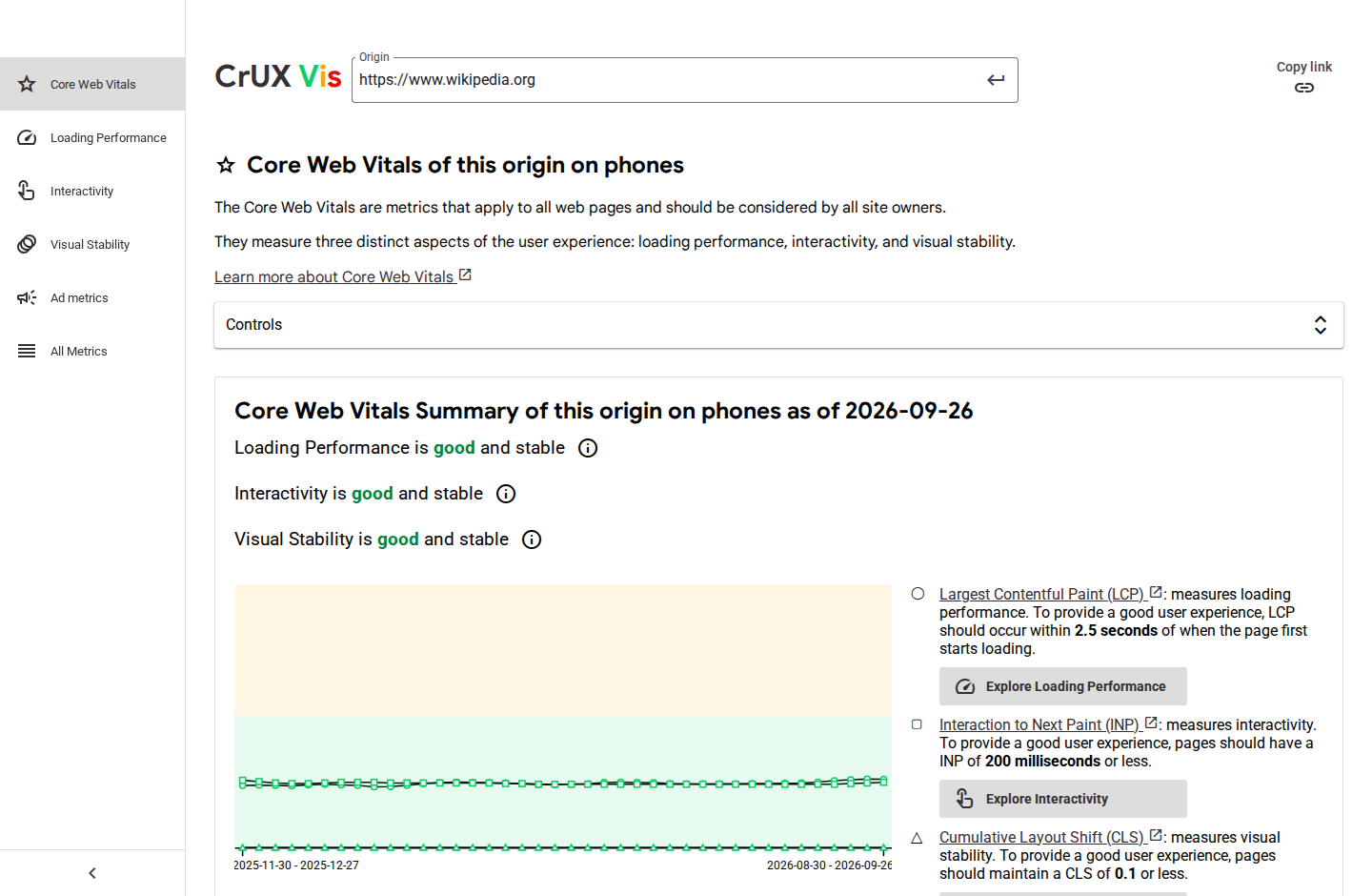
Earlier hands-on check, September 30, 2026, before our research-only method: CrUX Vis’s weekly phone-origin chart and summary for Wikipedia. It shows the controls and granularity, not current values. Source
Reasons to choose it
- Up to 40 weekly readings, updated every Monday
- Origin or single page, where Google has data
- Phone, desktop, tablet or all devices; 75th percentile and distributions
What to watch
- About ten months of history; no country view
- Google retired its previous free CrUX dashboard in November 2025
CrUX Vis turns Google’s CrUX History API into charts. Google’s guide specifies up to 40 weekly data points, updated every Monday, each covering the previous 28 days. You can look at a whole origin or one URL, choose phone, desktop, tablet or all devices, and show the 75th percentile, the distribution of visits, or both. Beyond the three Core Web Vitals it covers FCP, TTFB, LCP resource type, LCP image subparts, round-trip time, navigation types, device mix and ad metrics. Google says the CrUX Vis address can be shared and bookmarked. CrUX Vis guide, last updated May 6, 2025, CrUX History API guide
It keeps pace with the dataset. Google’s release notes say CrUX Vis was updated in October 2026 to show new experimental versions of the Core Web Vitals, including soft-navigation metrics for single-page apps. The same notes record one short delay to a weekly History API and CrUX Vis release in June 2026. CrUX release notes, last updated October 13, 2026
Read the full Google CrUX Vis analysis and sources
Choose something else if you need more than about ten months, a country view, or alerts. CrUX Vis has no country dimension and no customization beyond its controls. Google warns that a page may have no data even when its site does, and that the wrong protocol or a missing “www” can produce an empty result, so try the exact address your visitors use. It also cannot say what caused a slowdown. CrUX Vis guide
Continuity is better than for most free tools but not guaranteed. Google retired the older Looker Studio CrUX Dashboard after November 2025, saying it had suffered frequent outages and was not built for wide-scale use, and recommended CrUX Vis instead; the old dashboard’s page now carries a deprecation notice. A Google-run tool also means the address you enter goes to Google. Deprecation announcement, September 9, 2025, CrUX Dashboard page
In an earlier hands-on check on September 30, 2026, before we adopted our research-only method, an anonymous lookup for https://www.wikipedia.org loaded its phone-origin history with a summary for the 28 days ending September 26, 2026. That check showed the main path working on one day; it did not verify the values, and it did not decide this recommendation.
Used Google CrUX Vis? Share your experience to help other readers choose.
Treo Site Speed
Also consider · longer history and countries
Choose Treo when you need a longer monthly view, a particular country or audience context such as device mix and connection speed.
 View full size
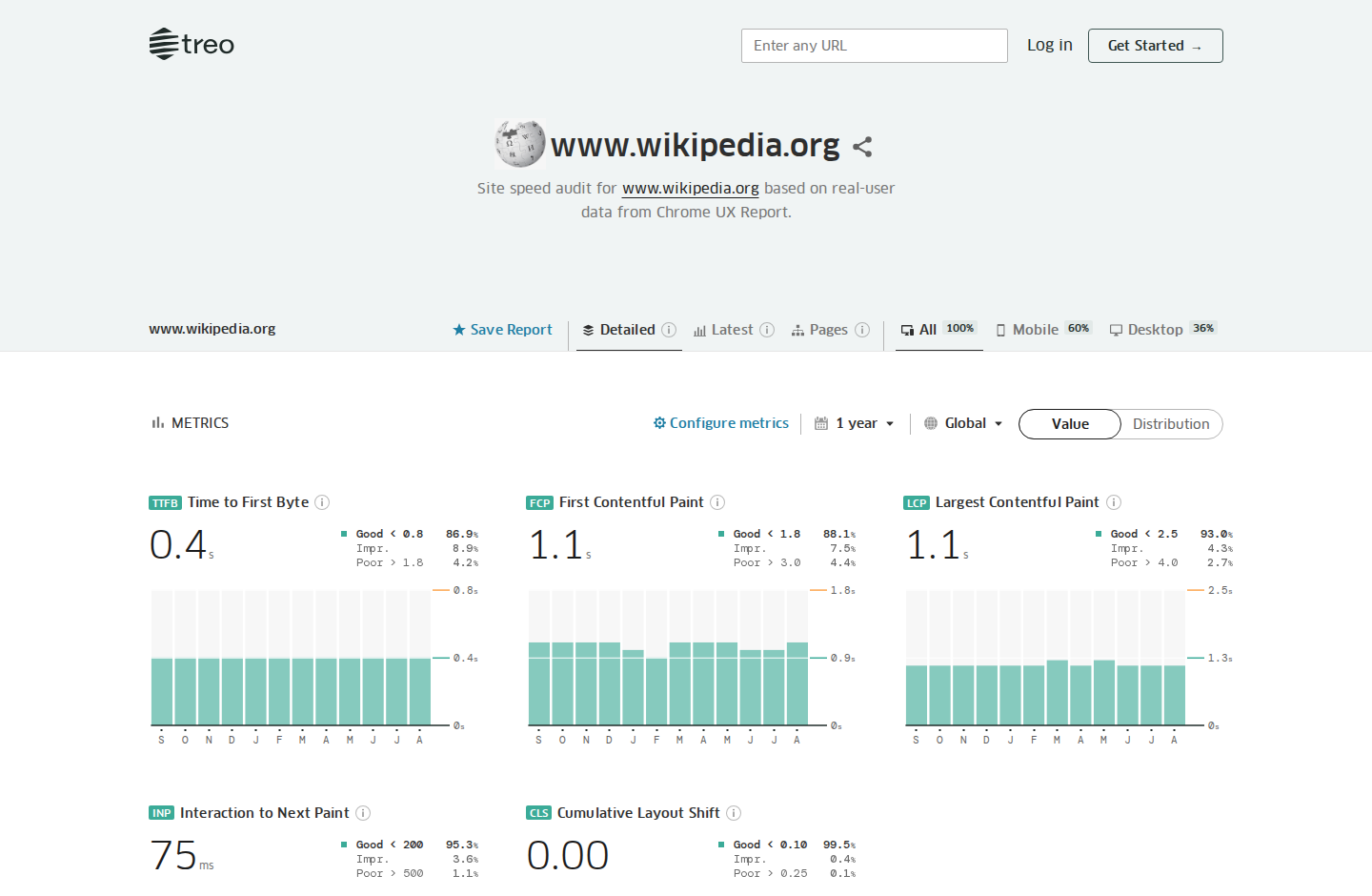
Earlier hands-on check, September 30, 2026, before our research-only method: Treo’s monthly charts and its interval, country and device controls for Wikipedia. It shows the controls and granularity, not current values. Source
Reasons to choose it
- Up to a year of monthly history in the free report
- Country filter and world map
- Device, connection and navigation-type breakdowns
What to watch
- Monthly bars lag recent releases by weeks
- Small company; terms do not address how long free tools last
Treo’s free Site Speed report needs no account: you enter a domain or a full URL and, if Google has enough data, get a report. Its documentation lists TTFB, FCP, LCP, INP and CLS as 75th-percentile values or as distributions, a breakdown of visitors by device, connection round-trip time and navigation type, a world map coloured by performance, and filters for device, country and time interval. The free report shows up to a year of history, with longer intervals on paid plans. When a site lacks data, the report says “No CrUX Data”. Site Speed documentation, Site Speed
Its history is monthly. Treo’s Sites page describes “new data added monthly” and data from more than 200 countries, which matches Google’s monthly BigQuery dataset, the CrUX source with a country breakdown. Google releases each month’s data on the second Tuesday of the following month, so on a given day Treo’s newest bar can end up to about six weeks earlier than CrUX Vis’s newest weekly reading. That makes Treo better for seasonal patterns, year-on-year comparisons or a market-specific question, and less direct for last week’s release. Treo Sites, CrUX on BigQuery, last updated October 13, 2026, Google’s tool matrix
Read the full Treo Site Speed analysis and sources
A free account saves up to five sites. Treo’s own pages disagree on how much history it keeps: the documentation table says one year and ten URLs per site, while the pricing page lists two years and 50 CrUX pages. Paid plans start with Vital at $900 a year, shown as $75 a month billed yearly, for 50 sites and five years of history. We read the published plans; we did not sign up. Pricing, checked November 5, 2026, Site Speed documentation
Treo d.o.o. is a small Slovenian company. The EU VAT register lists it as active in Maribor, and its footer dates the service to 2017. Its terms, last updated August 28, 2017, say nothing about how long free tools will remain available. Its privacy policy, updated January 15, 2026, says server access logs, including IP addresses, are kept for seven days, and lists AWS, Google Cloud, Sentry and Stripe as subprocessors. An independent 2021 walkthrough describes the same free report with monthly data and a country filter, so the free tool has a long record. We found no outage, breach, lawsuit or ownership change in our October 19 searches. Terms, privacy policy, data processing terms, 2021 walkthrough
In an earlier hands-on check on September 30, 2026, before we adopted our research-only method, Treo’s anonymous report for www.wikipedia.org showed twelve monthly bars running through August 2026, a one-year interval selector, a global or country selector and all, mobile and desktop choices. That observation is consistent with Treo’s documentation; it did not decide this recommendation.
Used Treo Site Speed? Share your experience to help other readers choose.
VitalSentinel CrUX History
Rising Star · a simpler weekly answer
Choose VitalSentinel for a plain recent verdict and a whole-site check when a page has no data, on a site you own or are authorized to check.
Reasons to choose it
- Up to 40 weekly readings for an origin or URL
- Phone or desktop, percentiles and distributions
- Documents a whole-site check when a page has no data
What to watch
- Owned or authorized sites only; no country, tablet or all-device view
- Rate limits apply; terms permit withdrawal at any time
Choose VitalSentinel when you want a plain recent verdict and help distinguishing a page with too little data from a whole site with too little traffic. Its free public tool documents up to 40 weekly readings of LCP, INP, CLS, TTFB and FCP, 75th-percentile values and visit distributions, for an origin or a full URL on phone or desktop. When a URL has no data, the maker says it also checks the origin and tells you whether widening the view would help. No account is required. These are documented capabilities, not a new hands-on test. CrUX history, checked November 5, 2026
Google’s dashboard remains our first choice for deeper exploration: VitalSentinel has no tablet, all-device or country view, and it reads the same underlying Chrome data. The published fair-use limits are six checks per minute, 40 per hour and 150 per day per IP, plus a per-site limit whose size is not stated. Its terms restrict checks to sites you own or are authorized to test, prohibit automated calls and allow the tools to be changed, limited or withdrawn at any time. Tool limits, terms, updated November 2, 2026, checked November 5, 2026.
Read the full VitalSentinel CrUX History analysis and sources
The operator is mountain explorer, s. r. o., company ID 53226119, confirmed by Slovakia’s official business and accounting registers. Its launch listing dates the first release to December 31, 2025; the About page rounds that to January 2026. The privacy policy says free-tool runs record the hostname, country, outcome and summary figures, with no IP address stored with the run; rate-limit keys derived from IP addresses expire within a day. Addresses can be sent to Google. This is the maker’s stated practice, not an independent privacy audit. Launch listing, About, official register, accounting register, privacy policy, updated November 2, 2026, checked November 5, 2026.
Used VitalSentinel CrUX History? Share your experience to help other readers choose.
CoreDash PULSE
Also consider · loading detail over 25 weeks
Consider CoreDash PULSE for weekly loading detail and an explained trend summary; CrUX Vis gives you a longer weekly record.
Reasons to choose it
- Site or URL, mobile or desktop
- Percentiles, distributions and LCP parts
- Tries addresses with and without “www”
What to watch
- 25 weeks of history; no country view
- Website privacy policy describes IP logs and cookies
CoreDash PULSE’s free report, run by performance consultant Arjen Karel, shows 25 weeks from Google’s CrUX History API for a site or URL, on mobile or desktop. Its documentation explains weekly percentiles and distributions, LCP parts, device and navigation breakdowns, and its own trend summary. It tries addresses with and without “www”. Choose it if you prefer that explanation and loading detail; CrUX Vis offers a longer weekly record and more device controls. CoreDash scores 3.65/5. Report, operator, checked November 5, 2026.
The website’s privacy policy describes IP logs and cookies; its separate browser extension’s promise of local processing does not establish how the website report handles addresses. Some text in the report template contains example improvements, so do not read those examples as findings about your own site. No hands-on lookup was performed for this comparison. Privacy policy, report documentation, checked November 5, 2026.
Used CoreDash PULSE? Share your experience to help other readers choose.
Which product are we missing?
Know a product that belongs in this article? Tell us what it does differently and why it deserves a closer look. Newcomers welcome.
Readers and product teams can suggest candidates. Suggestions inform our research; they do not guarantee inclusion or a recommendation.
Opens an email draft with this article attached as a link. Nothing is sent until you send it.
No email app? Send the product name, website, and this article’s title to admin@practicalpicks.guide.
What people are saying
We found no representative user survey for these tools. Commentary comes mostly from other performance companies, which have their own products to sell. DebugBear’s guide to CrUX Vis, updated November 26, 2025, calls the old CrUX Dashboard less user-friendly and limited to monthly data, and lists the same CrUX Vis limits we report: no data for low-traffic sites and pages, Android-only mobile data, a four-week lag and no improvement advice. Apogee Watcher’s August 2026 guide to replacing the retired dashboard, updated October 15, 2026, names CrUX Vis as Google’s first-party replacement for history charts and Treo as a third-party tool for exploring the field data in more depth. DebugBear on CrUX Vis, Apogee Watcher guide
Fershad Irani’s December 2021 walkthrough of Treo’s free report shows it was already in public use then; it cannot speak to today’s interface. Our October 19 searches surfaced no complaint pattern, incident or community discussion that changed these conclusions; a search that finds nothing is not proof that nothing exists. 2021 walkthrough
How we researched
This is public-source research. For this review we did not enter any address into these tools, create accounts, sign in, buy plans, use their APIs or contact the companies. No company supplied access or payment for this work. We first compared these tools on September 30, 2026. That first version included a short hands-on check of each tool’s public lookup with one well-known site; we report those observations above only as dated history, because we have since adopted a research-only method. On October 19, 2026 we rechecked every material claim against current sources: what each free route shows, how far back and how often, filters, account needs, prices, terms, privacy policies and ownership. We read Google’s CrUX documentation and release notes, Treo’s documentation, pricing, terms and privacy policy, the EU VAT register and independent write-ups.
We wrote this for a site owner or consultant who wants to see how real visitors experienced a public site or page over recent weeks and months, for example after a release. Every tool had to show more than the latest 28-day reading for free, without installing anything on the site or proving ownership. We fixed five criteria and their weights before scoring: history depth and freshness (30%), scope, filters and metrics (20%), ease of a usable answer (15%), data provenance and transparency (15%), and access terms, privacy and continuity (20%). CrUX Vis scores highest among the tools we could fully compare, 0.30 ahead of Treo on our five-point scale. Judging history by span rather than freshness would tie them. The public lookup routes are free; our five criteria compare what they show and the terms of access.
Several familiar routes fell outside that job. PageSpeed Insights shows only the latest 28-day reading. Search Console needs you to verify ownership and charts page counts by status, not metric values. Google retired its Looker Studio CrUX Dashboard in November 2025. BigQuery needs a cloud project and SQL. DebugBear’s free speed test shows Google’s field data beside a lab test; DebugBear says it includes some history but does not say how much, and its documented 40-week CrUX history is part of paid monitoring after a 14-day trial. We cover its free test in our page-diagnostics comparison. The other free viewers score below the four shown here: Auditzy 3.53/5, Unlighthouse 3.38/5 and RUMvision 3.30/5. Auditzy documents ten months of history but fewer controls; Unlighthouse documents 25 weeks; RUMvision’s domain report covers six months. None adds Treo’s country view or exceeds CrUX Vis’s weekly depth. Auditzy, Unlighthouse, RUMvision, checked November 5, 2026. SpeedVitals’ free checker needs no account and documents up to twelve months for a whole site and six for a single URL, on mobile or desktop. Its documentation does not establish the spacing or freshness of historical points, so we have not assigned it an overall score. Its terms also restrict commercial use, which limits its suitability for consultants. SpeedVitals checker, terms, checked November 5, 2026.
On November 5, 2026 we examined current tool documentation and the launch records retained from October 19. The directories we sought for newcomer discovery were not readable, so we screened the candidates already identified in our records and the additional SpeedVitals documentation. VitalSentinel’s December 2025 release qualifies as a recent entrant, and its documented core task, identified operator and public terms support the Rising Star recommendation. Its useful difference is the simpler verdict and the guidance when a page has no data. RUMvision, Unlighthouse, Auditzy and SpeedVitals have older product histories; CoreDash’s established performance business and undated viewer do not establish an eligible new entrant. The Core Web Vitals History extension dates to 2023 and requires installation, outside this comparison’s requirements. No other screened candidate qualified for Rising Star. Our independent incident and complaint searches remain those of October 19; we have not repeated a broad search since then. VitalSentinel launch listing, checked November 5, 2026.
| Tool | Public sources | What remains uncertain |
|---|---|---|
| Google CrUX Vis | CrUX Vis guide, History API guide, tool matrix, methodology, release notes, CrUX Dashboard deprecation notice. | How long Google keeps CrUX Vis free and available; whether every plotted value matches the API, which we did not audit. |
| Treo Site Speed | Site Speed and Sites documentation, pricing, terms, privacy policy, data processing terms, EU VAT register entry, 2021 independent walkthrough. | Free history length (one year or two), the exact data behind its bars (its documentation describes 28-day periods, its Sites page monthly data), and how long the free report will stay free. |
| VitalSentinel CrUX History | Tool documentation, pricing, launch listing, terms, privacy policy, integration page and official Slovak registers; checked November 5, 2026. | Chart accuracy, actual uptime and the unspecified per-site rate limit; terms permit withdrawal and restrict checks to owned or authorized sites. |
| CoreDash PULSE | Report documentation, operator biography and website privacy policy; checked November 5, 2026. | Report-specific address retention, service guarantees and chart accuracy; template examples are not findings. |
None of this establishes that any tool’s charts are free of errors, or how quickly they will reflect a change on your own site. Next substantive review is due January 17, 2027, or sooner if access, history length or ownership changes. Found a changed limit or term? Contact the editors.
Sources and evidence
Incumbent evidence was checked October 19, 2026 unless another date is given. Additional sources and free-access prices were checked November 5, 2026; the full article was not rechecked on that date. Google’s pages establish how its data and tools work; Treo’s pages establish its documented offer and terms, not error-free operation. Commentary from other performance companies is attributed opinion.
- Google: CrUX Vis; CrUX Vis guide, last updated May 6, 2025; CrUX History API guide; CrUX tools matrix, last updated September 9, 2025; CrUX methodology, last updated June 20, 2024; CrUX release notes, last updated October 13, 2026; CrUX on BigQuery, last updated October 13, 2026; CrUX Dashboard deprecation, September 9, 2025; CrUX Dashboard page with deprecation notice.
- Treo: Site Speed; Site Speed documentation; Sites; Sites documentation; pricing; terms, August 28, 2017; privacy policy, January 15, 2026; data processing terms; EU VIES VAT check for SI34122079 (TREO D.O.O., Maribor), October 19, 2026.
- Independent and third-party commentary: Fershad Irani, December 9, 2021; DebugBear on CrUX Vis, updated November 26, 2025; Apogee Watcher, updated October 15, 2026.
- Other routes and history viewers: PageSpeed Insights; Search Console Core Web Vitals report help; DebugBear free speed test; RUMvision history checker; CoreDash CrUX history; Unlighthouse CWV history; Auditzy checker.
This is a researched comparison, not a product review. Method: evidence standard, editorial picks.
Interface excerpts from an earlier hands-on check of the public Wikipedia lookups on September 30, 2026, before our research-only method. They show each tool’s controls and history granularity, not current values. Copyrights and trademarks remain with their owners; inclusion does not imply vendor endorsement. Our image-use approach and rights enquiries.