
Color contrast checkers for a text and background pair: Figma, WebAIM, Luma11y and EpitomeTool
Choose Figma to check and correct a text and background pair inside a design, WebAIM for a pair you already know without an account, or Luma11y for a desktop check. All four tools report WCAG 2 contrast.
Figma Design
The color picker’s contrast check gives normal-text, large-text and graphics results for the selected layer, and one click changes a failing value to the nearest passing color. Available on every plan, including free Starter.
Narrow lead: 4.10 against WebAIM’s 4.03. Needs a Figma account; confirm near-threshold pairs in WebAIM, because the rounding fix lacks independent confirmation.
Why Figma is our PickTeam behind Figma Design? Get your award badge
Luma11y
A free Windows and macOS public beta with typed colors, foreground transparency and WCAG text and interface results.
No automatic correction; macOS picker and permission reports remain. Narrow lead: 3.78 against Burg Color’s 3.68.
Why consider Luma11yWho is this article for? Designers and site owners who know a text color and background color and need to validate or adjust that pair before publishing.
About 19 min read
What Preferred Pick, Rising Star and Ready to Rock mean
The quick list
Choose Figma to check and correct a pair inside your design. Use WebAIM for a pair you already know without an account, Luma11y for a desktop app, or EpitomeTool to explore a suggested foreground.
All four are free for this job, checked November 5, 2026. Figma needs an account on any plan, including free Starter; Luma11y is a desktop installation.
The comparison at a glance
Compare which standard each tool applies, how it shows a ratio near 4.5:1, how it helps you fix a failing pair and who maintains it. Select up to three tools to compare.
Figma is our Preferred Pick, with a narrow lead over WebAIM; Luma11y is our Rising Star. Columns follow scores. Figma and EpitomeTool offer passing-color suggestions. All four remain selectable.
Hides matching answers for the selected tools. Unknowns and unverified claims stay visible.
| Feature | Figma Design | WebAIM Contrast Checker | Luma11y | EpitomeTool WCAG contrast checker |
|---|---|---|---|---|
| Best fit | Preferred Pick · check and correct a pair in a design | Alternative · a pair you already know, no account | Rising Star · a desktop contrast check | Explore a suggested foreground |
| Standard applied | WCAG ratio; help names no version; no APCA documented | WCAG 2 ratio; 2.0 and 2.1 thresholds, unchanged in 2.2; no APCA | Beta documents WCAG text and non-text contrast | Maker documents WCAG 2.1 and 2.2; no APCA |
| Ratio shown near 4.5:1 | Figma says its November 2025 fix uses the cut value | Cut to 2 decimals; pass or fail on the unrounded value | Beta notes describe calculation fixes; rounding rule unconfirmed | Rounding rule unconfirmed |
| Help fixing a failing pair | Click the failing indicator to change to the nearest passing color | Lightness slider for each color; no suggested color | Typed values and sliders; no automatic correction documented | Maker says one click applies a passing foreground found in OKLCH |
| Main drawback | Account needed; near-threshold fix lacks independent confirmation | No suggested passing color | Public beta; reported macOS picker and permission problems | Unconfirmed rounding and processing claims |
All four tools apply the WCAG 2 contrast ratio. W3C says not to round the computed ratio: 4.499:1 does not meet 4.5:1. Gray #777777 on white computes to 4.478:1, a fail; #767676 on white is 4.542:1, a pass. A passing pair does not show that a rendered page passes. Check text over images, gradients and interactive states separately.
All features and sources 12 criteria
Open the groups that matter to you. They compare the same selected tools. “Planned” means future work, not an available feature. Sources include the published conditions.
The pass or fail result
Show 4 criteria
| Feature | Figma Design | WebAIM Contrast Checker | Luma11y | EpitomeTool WCAG contrast checker |
|---|---|---|---|---|
| Best fit | Preferred Pick · check and correct a pair in a design | Alternative · a pair you already know, no account | Rising Star · a desktop contrast check | Explore a suggested foreground |
| Standard applied | WCAG ratio; help names no version; no APCA documented | WCAG 2 ratio; 2.0 and 2.1 thresholds, unchanged in 2.2; no APCA | Beta documents WCAG text and non-text contrast | Maker documents WCAG 2.1 and 2.2; no APCA |
| Ratio shown near 4.5:1 | Figma says its November 2025 fix uses the cut value | Cut to 2 decimals; pass or fail on the unrounded value | Beta notes describe calculation fixes; rounding rule unconfirmed | Rounding rule unconfirmed |
| Separate results | Auto, normal text, large text and graphics; AAA for text only | Normal text, large text and interface components; AA and AAA | Regular and large text; non-text components | Normal text, large text and interface components |
These selected tools have matching answers in this group. Turn off “Show differences only” to see them.
Sources for the pass or fail result
Incumbent accuracy evidence checked October 19, 2026: WebAIM script; Figma guide; rounding report and staff reply. Checked November 5, 2026: Luma11y beta notes; EpitomeTool guide. Documented capabilities do not establish accuracy for every pair.
Fixing a failing pair
Show 3 criteria
| Feature | Figma Design | WebAIM Contrast Checker | Luma11y | EpitomeTool WCAG contrast checker |
|---|---|---|---|---|
| Help fixing a failing pair | Click the failing indicator to change to the nearest passing color | Lightness slider for each color; no suggested color | Typed values and sliders; no automatic correction documented | Maker says one click applies a passing foreground found in OKLCH |
| Color input | Fills in the design; hex, RGB, CSS, HSL, HSB; canvas eyedropper | Hex or the browser color picker | Beta adds HSL, HSV, Lab and OKLCH to typed hex; screen picker | Maker documents hex, RGB, HSL, OKLCH and named colors |
| Transparent colors | Not documented for the contrast check | Text color only, blended onto the background | Foreground alpha documented in beta 2 | Not documented for the checker |
These selected tools have matching answers in this group. Turn off “Show differences only” to see them.
Sources for fixing a failing pair
WebAIM and Figma documentation, checked October 19, 2026; Luma11y beta releases and EpitomeTool documentation, checked November 5, 2026. Current repository features may not be in the downloadable beta.
Access, data and upkeep
Show 5 criteria
| Feature | Figma Design | WebAIM Contrast Checker | Luma11y | EpitomeTool WCAG contrast checker |
|---|---|---|---|---|
| Where it runs | Figma desktop app or browser; account needed | Web page; nothing to install | Windows and macOS desktop public beta | Web page; nothing to install |
| Sharing or recording a result | Stays in the design file | Permalink and a JSON response | Copyable results described in the repository | No result-sharing feature documented |
| Price and account | Free Starter covers this job; Figma account needed | Free; no account | Free, GPL-3.0; no account | Free; no account |
| What happens to your colors | Part of your Figma file; content training on by default for Starter and Professional | Calculated in your browser; in an address only if you open the permalink | Local desktop calculations; screen-recording permission needed for macOS picker | Maker says inputs stay in the browser; AdSense loads page and device data |
| Maintenance signal | Developed by Figma; rounding fix announced November 2025 | WebAIM at Utah State University; no public checker change log | Human commits through November 4, 2026; released beta may lag current code | No named maintainer or public release history established |
These selected tools have matching answers in this group. Turn off “Show differences only” to see them.
Sources for access, data and upkeep
Checked November 5, 2026: Figma pricing, WebAIM, Luma11y repository and issue list, EpitomeTool About and privacy policy. Figma content-training settings retain their October 19 evidence date.
What matters when choosing
Figma Design’s built-in contrast check is our Preferred Pick for checking a text and background pair and correcting it in place, but its lead is narrow. It scores 4.10 out of 5 and WebAIM Contrast Checker 4.03, a margin smaller than a one-point change in any of our five criteria. Figma leads on correction and on working with colors where they already live: it is available on every Figma plan, treats the selected layer as the foreground, reports normal text, large text and graphics, and one click on a failing result changes the value to the nearest passing color. WebAIM gives the better-supported answer near the threshold. Until a fix Figma announced on November 2, 2025, Figma rounded the ratio, so a pair just under 4.5:1 could show as a pass, and we found no independent confirmation of the fix; check close results in WebAIM. You also need a Figma account, and content training is on by default for Starter and Professional teams. Disclosure: Practical Picks is researched and written with Claude, an AI model made by Anthropic. Figma documents connecting its MCP server to Claude Code and Claude Desktop. AI features carried no weight in this comparison, and we have no relationship with Figma or Anthropic. Figma color picker guide, rounding report and fix, Figma MCP guide
Choose WebAIM Contrast Checker for a pair you already know, with no account or design file. It is free, needs no installation, and gives separate results for normal text, large text and interface components against the WCAG 2 thresholds. Its published script decides pass or fail on the unrounded ratio and shows the ratio cut to two decimals, never rounded up, so a pair at 4.497:1 shows 4.49 and fails, which is what W3C’s guidance asks for. Lightness sliders for both colors and a transparency field for the text color help you adjust a failing pair, and a permalink records the result. It never suggests a passing color for you, and it checks only the two values you enter. WebAIM checker, its published script, W3C on not rounding
Luma11y is our Rising Star for a desktop contrast check, scoring 3.78 out of 5. Its lead over Burg Color’s 3.68 is narrow. The free Windows and macOS app accepts typed colors, blends foreground transparency and reports WCAG text and non-text results. Its public beta offers a route beyond the browser with active maintenance, rather than CCA’s stalled updates. It does not suggest a passing replacement, and users have reported macOS picker and permission problems. Repository, beta releases, user reports, checked November 5, 2026.
All four tools compared here use the WCAG 2 contrast ratio, the measure in WCAG 2.2, the current W3C Recommendation. Normal text needs at least 4.5:1 against its background, large text 3:1, and interface components and meaningful graphics 3:1, subject to the criteria’s exceptions. APCA is a different perceptual method; an APCA score does not show WCAG conformance today. WCAG 2.2 SC 1.4.3, WCAG 3 draft.
A passing pair does not mean a page passes. W3C advises checking the colors set in the markup and stylesheets rather than sampling text pixels on screen, because anti-aliasing makes thin text look lighter than its specified color. Text over images, gradients, hover and focus states, and the rest of the page need their own checks, which our browser accessibility checker comparison covers.
Figma Design
Preferred Pick · check and correct a pair in a design
Our Preferred Pick, narrowly: choose Figma’s built-in check to test a pair and correct a failing value in place. Confirm near-threshold pairs in WebAIM.
Reasons to choose it
- One click changes a failing value to the nearest passing color
- Works on the layers you are already designing
- Normal text, large text and graphics settings
What to watch
- Rounded near-miss ratios to a pass until a November 2025 fix
- Needs a Figma account; content training on by default for Starter and Professional
Figma’s color picker has a Check color contrast control that opens an accessibility view. Figma’s help center says the selected layer’s color is always the foreground, and lets you choose Auto (based on the selected layer), large text, normal text or graphics, with AA and AAA levels (AAA for text only). When a value fails, an indicator appears; clicking it will “auto-correct the value to its nearest compliant color”. Figma says the picker is available on any plan to anyone who can edit the file. The help article describes WCAG thresholds without naming a version or APCA, and does not explain how the background color is chosen when layers overlap or use transparency. The article shows no date; Figma’s help-center record lists its last edit as October 1, 2025. Figma color picker guide
Check results close to 4.5:1 a second way. On June 17, 2025, a designer reported that Figma passed a pair WebAIM failed at 4.49:1; other users later raised compliance concerns, and one reported the same component passing in one file and failing in another. On November 2, 2025, a Figma staff member wrote that the team “rolled out an update that uses the truncated value” for pass or fail. We found no later report of the problem, and no independent confirmation of the fix. Forum thread
Read the full Figma Design analysis and sources
The check sits inside your design file, which matters for client work. Figma’s help center says content training is on by default for Starter and Professional teams and off for Organization and Enterprise plans, and that team admins can switch it off. A proposed class action filed in November 2025, Khan v. Figma, alleges that Figma trained AI models on customer designs without permission; Figma has denied it, and in May 2026 the court sent the claims to arbitration, which is not a finding either way. Figma, Inc., a Delaware company that files annual reports with the US Securities and Exchange Commission, operates Figma and is the company named in its terms and privacy policy. Figma also hosts a separate free web checker for two hex values, with no correction and no stated rounding rule. Choose WebAIM instead if you do not work in Figma or need a check that does not depend on a design file. Content training settings, lawsuit filed, Bloomberg Law, November 21, 2025, arbitration order, Bloomberg Law, May 11, 2026, Figma terms, SEC company record, Figma web checker
Used Figma Design? Share your experience to help other readers choose.
WebAIM Contrast Checker
Alternative · a pair you already know, no account
Choose WebAIM when you know both colors and want a pass or fail you can rely on near 4.5:1, with separate normal-text, large-text and interface results.
 View full size
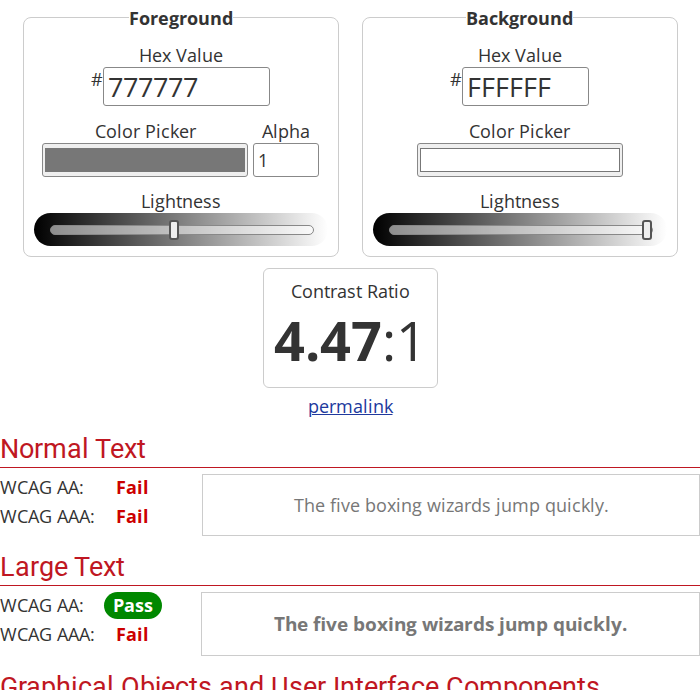
Gray #777777 on white fails normal text but passes large text at AA. Earlier hands-on check, September 30, 2026, before our research-only method; synthetic colors only. Source
Reasons to choose it
- Never rounds a near miss up to a pass, per its published script
- Separate normal text, large text and interface component results
- Lightness sliders, text-color transparency and a permalink
What to watch
- No suggested passing color
- Checks two values, not the page you build
Enter two hex values, or pick colors with your browser’s color picker, and WebAIM shows one ratio with pass or fail results for normal text at AA and AAA, large text at AA and AAA, and graphical objects and interface components at AA. The explanation on the page still cites the WCAG 2.0 and 2.1 thresholds; WCAG 2.2 kept those numbers unchanged. WebAIM’s published script compares the unrounded ratio with each threshold and, in the words of its own comment, “truncates the number to 2 decimal places without rounding”. It linearizes colors with 0.03928, the constant in older WCAG text, which W3C says has no practical effect on the result. No APCA. WebAIM checker, published script, relative luminance in WCAG 2.2
A user report and our own earlier observation agree with the script. In a June 2025 Figma forum report, a designer showed WebAIM failing a pair at 4.49:1 that Figma and the Stark plugin both passed at 4.5:1; our calculation from the WCAG formula puts that pair at 4.496:1, a fail. And in an earlier hands-on check on September 30, 2026, before we adopted our research-only method, WebAIM showed 4.47:1 for gray #777777 on white, failed it for normal text and passed it for large text; the unrounded ratio is 4.478:1. Figma forum report
Read the full WebAIM Contrast Checker analysis and sources
To fix a failing pair, move the lightness slider under either color until the result passes. There is no button that proposes a passing color; for that, use Figma’s check or Tanaguru. A transparency value applies to the text color only, and the script blends it onto the background before calculating. The page’s eyedropper uses your browser’s color picker; type the value from your stylesheet or design file instead when you can, because sampled screen pixels can differ from the color you set. A permalink reopens the same pair, and adding &api to it returns the ratio and results as JSON. WebAIM also offers a separate link contrast checker for links identified by color alone. WebAIM checker, link contrast checker
WebAIM is a non-profit service center within the Institute for Disability Research, Policy & Practice at Utah State University, and announced the checker in 2009. Section508.gov’s training, reviewed in March 2026, demonstrates it for a text color pair. The published script makes no network request with your colors; they appear in a web address only when you open the permalink. The page itself loads Google Analytics. WebAIM publishes no change log for the checker. Choose another tool if you need suggested passing colors or want to check text on a gradient or image. About WebAIM, 2009 announcement, Section508.gov training
Used WebAIM Contrast Checker? Share your experience to help other readers choose.
Luma11y
Rising Star · a desktop contrast check
Choose Luma11y for typed color pairs and screen sampling in a desktop app with active development.
Reasons to choose it
- WCAG results for normal text, large text and non-text components
- Typed color formats and foreground transparency
- Recent human maintenance and public source code
What to watch
- No automatic passing-color suggestion
- Public beta; users report macOS picker and permission problems
Luma11y is a free GPL-3.0 contrast analyser for Windows and macOS. Its public beta releases document typed color input, HSL, HSV, Lab and OKLCH formats, foreground transparency, and WCAG contrast calculations. The repository describes separate results for regular and large text and non-text components, a screen picker and copyable results. Choose it when you need a desktop app rather than a browser form. Repository, releases, checked November 5, 2026.
The first release listed is beta 1, dated June 2, 2026; beta 2 followed on September 11. The maker has continued human development through November 4. That work includes signing and update changes, but a change in the repository does not establish that a beta installer contains it. The release notes describe fixes to contrast calculations; they do not establish accuracy for every pair. Releases, commit history, checked November 5, 2026.
Read the full Luma11y analysis and sources
There is no automatic passing-color suggestion in the documented beta. Open issue titles include a picker choosing the wrong color on a Mac, permissions after upgrading, and sliders not updating a color. We read the issue list rather than treating those titles as verified diagnoses; type known color values when you can. The repository lists no published security advisory, which is not a security audit. Issues, security advisories, checked November 5, 2026.
Used Luma11y? Share your experience to help other readers choose.
EpitomeTool WCAG contrast checker
For exploring a suggested foreground
Consider EpitomeTool for a suggested foreground replacement; confirm your final pair in WebAIM.
Reasons to choose it
- Documents a one-click passing foreground suggestion
- Hex, RGB, HSL, OKLCH and named colors
- Separate text and interface results
What to watch
- Rounding and processing claims lack independent confirmation
- No named operator or established first-release date
EpitomeTool documents hex, RGB, HSL, OKLCH and named-color input, separate text and interface results, and a one-click foreground correction. Its guide says it holds hue and chroma constant and searches lightness in OKLCH for a passing color. Choose WebAIM for the better-supported near-threshold result; EpitomeTool is worth considering when you want to explore a suggested replacement without a design account. These are the maker’s descriptions, not results we obtained. Checker, checked November 5, 2026.
The tool is free with no sign-up. Its About page describes an independent developer, but does not name that person; the contact page instead describes a small team. The privacy policy says inputs stay in the browser while Google AdSense receives ordinary page and device information. We have not independently checked the processing claim or the rounding rule. The May 31, 2026 update date does not establish when the tool first became public, so it receives no newcomer award. About, contact, privacy, checked November 5, 2026.
Used EpitomeTool WCAG contrast checker? Share your experience to help other readers choose.
Which product are we missing?
Know a product that belongs in this article? Tell us what it does differently and why it deserves a closer look. Newcomers welcome.
Readers and product teams can suggest candidates. Suggestions inform our research; they do not guarantee inclusion or a recommendation.
Opens an email draft with this article attached as a link. Nothing is sent until you send it.
No email app? Send the product name, website, and this article’s title to admin@practicalpicks.guide.
What people are saying
We found no independent, representative satisfaction survey for contrast checkers. The most useful public record is the June to November 2025 Figma forum thread, where designers showed Figma, and at the time the Stark plugin, passing a pair that WebAIM and Tanaguru failed, and asked Figma to fix it for legal compliance work; Figma says it did. CCA’s issue tracker shows users still reporting eyedropper failures through June 2026 after its maintainer said he could no longer update it. Section508.gov’s training, reviewed in March 2026, demonstrates WebAIM and links CCA videos, the A11Y Project lists CCA and Tanaguru, and a European Commission guide lists Color.review. Those listings show use and curation, not accuracy. Figma forum thread, CCA issues
How we researched
This is public-source research. For this review we installed nothing, created no accounts, signed in nowhere and ran no tests. In an earlier hands-on check on September 30, 2026, before we adopted our research-only method, we entered one opaque pair, gray #777777 on white, in WebAIM, Tanaguru, Color.review and a fourth web checker in an anonymous browser session. We quote those results only as dated observations. On October 19, 2026, we rechecked every claim against current public pages, read the published scripts of WebAIM and Color.review to see how they round, and calculated reference ratios from the WCAG formula. No vendor supplied access or payment, and our links carry no affiliate tracking.
We wrote this for designers and site owners who know a text color and its background color and want to confirm the WCAG 2 result, or find a passing replacement, before publishing. The criteria are a dependable, clearly labelled pass or fail, especially near the threshold (30%); help correcting a failing pair (20%); input fit, including formats, transparency and where the colors live (15%); cost (15%); and maintenance and continuity (20%). Figma scores highest, narrowly, because it corrects a failing pair in place and works on colors where they already live; WebAIM gives the best-supported near-threshold answer for a pair you already know. The tools shown are free for this job.
On November 5, 2026, we reviewed the named candidates’ public documentation. Luma11y’s public beta qualifies for our Rising Star: it documents the core task on Windows and macOS and has recent human maintenance. A beta label alone is no reason to exclude it. Burg Color also qualifies, scoring 3.68: its free browser extension accepts CSS colors and reports WCAG results, but requires installation and offers manual adjustment rather than a passing-color suggestion. Luma11y’s lead is narrow. CapyToolkit’s guide still contains incorrect worked ratios; Rocket Validator is an established accessibility vendor’s tool; EpitomeTool and Plainview Web have no established first-release date. We could not identify the unnamed March 2026 Figma plugin. Luma11y, Burg Color, checked November 5, 2026.
Other documented options scored below the four shown: Accessible Colors and Stark, 3.65 each; Plainview Web, 3.43; Coolors, 3.40; Tanaguru, 3.28; Colour Contrast Analyser, 3.23; Snook’s Colour Contrast Check, 3.20; Figma’s separate web checker, 3.15; Siege Media’s Contrast Ratio, 3.10; and Color.review, 3.05. Accessible Colors suggests lighter or darker passing replacements, and its published source history ends in July 2019; current support remains unclear. Stark’s free core checker needs an account; passing-color suggestions are paid. Coolors’ explanation misdefines large text. Tanaguru offers several passing candidates but sends colors in its result address; CCA has unresolved maintenance and picker problems; Color.review hides near misses with a one-decimal display. Contrast Ratio still offers a pair checker on Siege Media’s site. Accessible Colors, Stark, Coolors, Tanaguru, CCA, Snook, Figma web checker, Color.review, Contrast Ratio, checked November 5, 2026.
WhoCanUse scores 3.30 and adds vision simulations, but its own issue list includes concerns about misleading pass/fail grading. WebAIM’s link checker covers a narrower AA link-and-body-text use; it directs large-text and AAA checks to the standard checker. We could not confirm Adobe Color’s current price or access requirements. Rocket Validator’s separate checker is free and scores 3.53; it offers suggested variations for a pair. Browser developer tools, WAVE and ARC inspect built pages; JAWS is a screen reader. None replaces the pair-checking task. WhoCanUse, user reports, WebAIM link checker, checked November 5, 2026. The editable Color Palette app scores 3.53; Retna scores 3.58 but its worked correction examples contain inconsistent ratios. FontBlend and Color Scorer lack enough pricing or input detail for complete scores. Color Palette, Retna, FontBlend, Color Scorer, checked November 5, 2026.
| Tool | Public sources | What remains uncertain |
|---|---|---|
| Figma Design | Color picker and content-training help articles, forum thread with staff reply, MCP guide, web checker, terms, privacy policy, SEC company record, court reporting. | Whether the November 2025 rounding fix holds in every file; how the background is chosen with overlapping or transparent layers. |
| WebAIM Contrast Checker | Checker page and published script, About page, 2009 announcement, Section508.gov training, Figma forum report. | How the browser eyedropper samples on your display; whether WebAIM will update the page’s WCAG wording. |
| Luma11y | Public beta notes, repository, human commit history, issue list and security-advisory page, checked November 5, 2026. | Picker and permission reports; which recent changes are in the downloadable beta; no independent accuracy confirmation. |
| EpitomeTool WCAG contrast checker | Tool, About, contact and privacy pages, checked November 5, 2026. | First public release, named operator, rounding and independently confirmed processing behavior. |
None of this establishes how each tool behaves on your display, browser or design file, or replaces checking the rendered page. The four tools shown are free for this job, checked November 5, 2026; Figma needs an account. Next substantive review is due December 18, 2026, or sooner if a tool, a standard or its maintenance changes. Found a changed result or term? Contact the editors.
Sources and evidence
- Standards: WCAG 2.2 Recommendation, December 12, 2024 version (SC 1.4.3, contrast ratio, relative luminance); Understanding SC 1.4.3; WCAG 3 Working Draft, September 10, 2026.
- WebAIM: checker; published script; link contrast checker; About; 2009 announcement; terms.
- Figma: color picker guide, last edited October 1, 2025 per the help-center record; AI settings and content training; MCP server guide; web contrast checker; forum thread, June 17 to November 2, 2025.
- TPGi and CCA: product page, current version 3.5.5; releases; issues #232, #300, #373, #374, #377, #381, #382, #386; Electron release schedule; Luma11y releases.
- Tanaguru: Contrast-Finder; source repository.
- Color.review: tool; Product Hunt listing.
- Other tools named: Chrome DevTools contrast guide, last updated October 19, 2022; What’s new in DevTools, Chrome 149, June 2, 2026; Stark contrast checker support page; Stark contrast update, July 8, 2025; Stark pricing; Adobe Color contrast checker; Coolors contrast checker.
- Independent and community evidence: Section508.gov training, reviewed March 2026; A11Y Project resources; European Commission colour tools guide; Bloomberg Law reports of November 21, 2025 and May 11, 2026.
Evidence checked October 19, 2026. Product behavior is attributed to the provider’s documentation or published code, to dated user reports, or to our labelled September 30, 2026 observations. Our searches for security advisories, lawsuits, shutdowns and ownership changes found the CCA maintenance notice and the Figma case above; a search that finds nothing is not proof that nothing exists. These are design-time color-pair tools. They do not replace inspection of the rendered page, testing with assistive technology or a full WCAG audit.
Additional documentation checked November 5, 2026: Figma terms and privacy; Luma11y repository, releases, maintenance, issues and advisories; EpitomeTool checker, About and privacy. Checked November 13, 2026: Figma terms, privacy policy and SEC EDGAR company record for Figma, Inc. Other incumbent findings retain their October 19 evidence dates.
Interface excerpts captured September 30, 2026, in an earlier hands-on check made before we adopted our research-only method, using only synthetic colors. They show each interface as it was that day, for product identification and analysis. Copyrights and trademarks remain with their owners; inclusion does not imply endorsement. Our image-use approach and rights enquiries.